Showing posts with label The Office. Show all posts

Friday, November 18, 2011

Arrested Development, Parks and Recreation Paper Dolls by Kyle Hilton

Photobucket
Who would win in a fight: Gob Bluth or Ron Swanson? (Ron, obviously!)
I thought I'd take a break from NaNoWriMo to let others like me, who enjoy paper dolls based on TV shows, about Kyle Hilton. Kyle has made several dozen free printable paper dolls from shows such as Arrested Development and Parks and Recreation. I also noticed that he has The Office paper dolls listed as "coming soon." He's an amazing artist so I can't wait to see them!

And, on a not unrelated note, if you haven't seen my Office paper dolls yet, here they are all in one place:


Friday, September 02, 2011

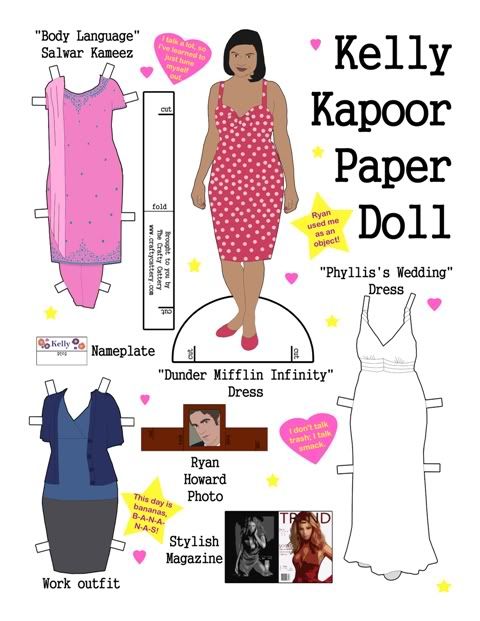
New "The Office" Paper Doll: Kelly Kapoor

Photobucket
Kelly Kapoor Paper Doll PDF

The stylish Kelly Kapoor (played by Mindy Kaling) is my favorite character from the US version of The Office and I am so happy that I finally got around to making a paper doll of her. She comes wearing the pink polka dot dress from the episode "Dunder Mifflin Infinity" (Kelly to Ryan: "Well, I hope you're still committed because I'm pregnant and guess what buddy, I am keeping it!"). Her additional outfits are a blue and gray work outfit, the white dress she wore to Phyllis's wedding ("I look really good in white") and the pink salwar kameez she wore when applying for the minority executive training program in "Body Language." Her accessories are a framed photo of Ryan Bailey Howard, a stylish magazine and the customized nameplate she got from Stanley in "Christmas Party."

All you need to do to get the doll is click on the link to open the PDF, print it on heavyweight paper, cut everything out (you might want to use an X-acto knife to get the fine details) and enjoy! I've also made dolls of Michael, Dwight, Pam, Jim and Creed - you can find them here.

Monday, March 28, 2011

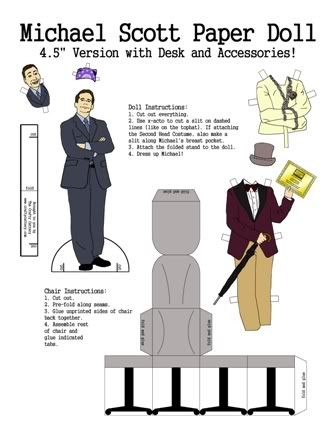
"The Office" Paper Doll: Michael Scott with Desk and Costumes

I've made a new Office paper doll! Well, actually it's the Michael Scott doll I made a couple years ago but I've given him costumes and accessories.

Photobucket

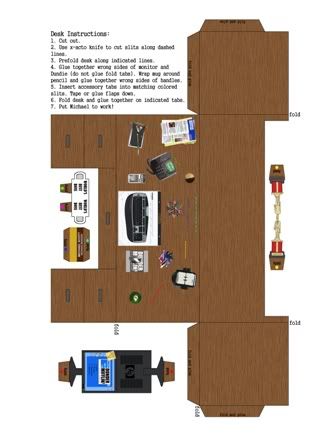
Costumes include Willy Wonka (from "Golden Ticket"), magician's straight jacket, Prison Mike doo-rag and Michael's second head Halloween costume. Michael comes with his chair and desk, complete with monitor, Dundie, nameplate and World's Best Boss mug. Click here to download the PDF (Note that the file is somewhat large so it may take a little while for it to load). Download it, print it on heavyweight paper, cut everything out and enjoy!
Photobucket Photobucket

I want to say thanks to tanster for featuring this doll on Officetally a few weeks ago. Thanks tanster!

You can find the Dwight, Pam, Jim and old Michael dolls I created a while ago here, and my Creed doll with accessories is here.

Here are some photos of the assembled doll and desk:

Photobucket
Photobucket Photobucket


Photobucket

Photobucket

Monday, February 28, 2011

How I Did It: The Office Ypsilanti Bobblehead Movie

This is a follow-up to my post of 2/18/11. Here's the film again in case you missed it (FYI it's 12 minutes long):


This project has been in the works for years. In 2007 I joined NBC's fansite for The Office, Dunder Mifflin Infinity (it's now called Dunder Mifflin Sabre). I met a bunch of cool people who loved the show as much as I did and we had fun geeking out and playing games on DMI.

In the spring of 2008 I created this puppet video for a contest on DMI. It made it in to the top 5 entries but didn't win. However, I had so much fun making it that I started to look for something else to film. I worked with a friend from DMI and we came up with a story idea then wrote a script. But it seemed too complicated for puppets so we ended up sitting on it for a few years.

In 2009 I ran across an animation program called Anime Studio Debut 6. It was cheap so I bought it and played around with it for a while. Once I had a general idea of how it worked, I picked our script up again and decided that it would be possible to use Anime Studio Debut to film it. Here's what I did.

Actors and Lines 

Photobucket
The different expressions I asked my actors to photograph.

The actors in this film are my friends from The Office fansite and are located all across the country (one is even in the UK!). So everything we did had to be done over the internet.

The first step was to get photos of my actors' faces. I went through the script and figured out all the expressions that the characters would need to make during the film. I then asked my actors to take photos of their heads making each of the expressions as well as a photo of the back of their head for when the character was facing away from the camera. Even if I wasn't sure if a character needed that expression, I had them do it anyway. This was a good idea since I ended up needing some of those expressions later.

At the same time, I sent each person a numbered list of lines for them to record. They recorded the lines and emailed them to me. This was actually one of the biggest headaches for me because there were so many different file types and often my computer didn't want to read them. However, my dad recommended GoldWave, a downloadable audio editing program (it's free to try, $49 to buy). Not only did it read all the file types and convert them into .wav files for me, it also allowed me to increase the volume in the clips and clean up a lot of the background noise.

Creating the Bobbleheads

Photobucket
Before and after: pencil sketch to shaded color body.

I had the lines and the actor's photos so now it was time for me to make the bobblehead characters. I drew by hand a body for each character then scanned my drawing into Photoshop where I cleaned it up and colored it. I purchased a cheap USB tablet that was a huge help when it came to working in Photoshop. It made drawing, coloring, and cropping much easier.

Next I cropped out each head and put them in the same Photoshop file as the body, resizing them to fit on the body. I had a layer for each head and one for the body.

Now I needed a way for the mouths to move when the characters talked. In Photoshop I cut out the lower lip and jaw of each face that needed to talk then made additional layers and moved the mouths in to five different positions, from closed to open wide.

I saved each mouth, face, and body layer individually as a .png file then imported all the layers for a character into an Anime Studio Debut file. I rigged the figure and saved it so that I could import it in to any other Anime Studio Debut file and it would be ready to "act"!

Backgrounds

Photobucket
 I combined two photos I took at Wiard's Apple Orchard to create one long background for a scene.

Most of the backgrounds are photos. I put them all through Photoshop's "Cut Out" filter so that they would look more cartoonish as well as to compensate for the fact that some photos weren't the same quality as others. If there was a piece of furniture or other object that a character would need to stand behind, I duplicated the background in to a new layer then cut out the object. In animating the character layer would be between the furniture layer and the background layer and thus would appear to be standing behind the furniture.

Props

Photobucket
 Goat photo (actually from the petting zoo at Wiard's Orchard, not Domino's Petting Farm), before and after Photoshopping.

Props were pretty easy, I just took a photo then I cut the object (such as a phone) out of the photo then put it through Photoshop's "Cut Out" filter. The hardest props weren't really props at all but characters - the animals at the petting zoo. It was not easy to get that goat to move!

Animating

Photobucket 
Animating in Anime Studio Debut

Once I had the bobbleheads, backgrounds and props I could finally start animating. Though I had done a few test animations before starting, I went into this with almost no idea how to use Anime Studio Debut. Consequently there was a lot of frustration and more than a few tears before I was done. That's probably one explanation for why it took me ten months to animate this thing!

I wish I had the time to explain how to use Anime Studio Debut but it is so complicated that I don't think there is any way I could do it. I learned by fiddling around with it, using the tutorials provided with the software and going to the Anime Studio forum when there was a question I couldn't answer elsewhere.

While I can't go through everything, I will mention a few things I did to make the animating easier:

- Instruction Sheet. I made an instruction sheet for myself. If I figured out how to do something complicated I wrote it down so I wouldn't have to figure it out again the next time.

- Scene Chart. I created a spreadsheet with each scene listed. I broke down the scenes by shots (parts of the scene that require a different angle or background) then gave each shot a number (1-1 would be scene 1, shot 1). Next to the shot I copied from the script the description of the action and any lines spoken in that shot. I then named my animation files with those numbers so I could keep track of what I was animating.

- Keep Clips Short. Anime Studio Debut can slow down if a scene has a lot of layers and action so I tried to keep each clip to about twelve seconds. If the clip went longer, I often would break it up into two different clips.

- Use Sync Switch Layers Feature. The ability to sync switch layers to an audio file in Anime Studio Debut is awesome! I used it to make the characters talk. All I had to do was import the audio file then sync the mouth switch layer to it and the program would automatically make the mouths flap according to the loudness of the audio. It's not perfect, though, so I always had to go back and clean it up a bit.

- Mix Audio with Goldwave. Anime Studio Debut only allows you to have two audio files in the program at once. This wouldn't work for scenes where I had several people talking at once. I solved this by first pasting together the different audio clips in GoldWave then importing one big audio clip into Anime Studio Debut. I synced all the characters' mouths to that one file then went in and cleaned it up so that the characters only talked during their lines.

- Watch Out for Popping Audio. Be aware that if you have two audio files in Anime Studio Debut and they are producing sound at the same time, you may end up getting a popping sound. For example, in the raining picnic scene I originally had one audio file for the thunder and another for speaking, but I found that whenever there was thunder at the same time as someone was speaking I would get the popping sound. I solved this by removing the thunder audio file and adding it back in when the animating was done using Windows Movie Maker.

- Watch Out for Spatial Positioning. Another sound quirk that Anime Studio Debut has is called spatial positioning. It is turned on automatically for every audio file and changes the loudness of the file and which speaker the sound comes out of depending on where your "camera" is relative to the position of the audio clip. I didn't notice that this was a problem until one day when I was animating using my headphones and realized that sometimes the sound would come out one earbud but not the other. At first I thought something was wrong with my headphones, then with my sound card, then with my audio file...it took me forever to realize that it was all due to an annoying check box hidden in the audio file properties in Anime Studio Debut!

- Making it Rain. This wasn't easy. In the more expensive version of the software (just called Anime Studio, without the "Debut") there is something called Particle Effects which apparently make it much easier to animate things like rain. But I had the cheap version, of course, and Particle Effects doesn't come with it. What I did was draw some diagonal lines in a layer, then replicated them over and over using the Scatter Brush tool. I then animated the layer to move from top to bottom across the screen and when it reached the bottom, to jump back to the top and cycle back to the bottom again. I duplicated that layer and animation a couple times and moved their timing around so that there would always be rain on the screen.


Putting It All Together

Photobucket
 Editing in Windows Movie Maker

By the time I was done animating, I had about 60 video clips of various lengths that needed to be edited together. To do this I used Windows Movie Maker which came free with my computer.

I got some flack from my husband for using Movie Maker. Apparently a lot of people find it lame, fit only for putting together vacation slideshows. But I liked that it was simple and would easily produce a file in the 16:9 widescreen dimensions that I needed for Youtube. I did take a look at another program, Adobe Premiere Elements, and while it had some neat stuff and would let me mix more than one audio track at a time, it was also extremely limited in the choices it gave me for what file types and sizes it would produce. It didn't have an option in the dimensions I needed so I chose not to use it.

Like Anime Studio Debut, Windows Movie Maker gets very slow and unwieldy with larger files so I first broke up my movie into four parts. I edited each part together, removing any extra footage, adding in scene transitions and extra audio files like the thunder. Next I published and saved each of the four parts in the highest quality format I could. Finally I put the four parts along with opening and closing credits in a new file and published the final file. I was done!

*

I hope this helps explain how I created this film. Though it was a lot of hard work I also had a lot of fun and enjoyed pushing myself to learn something new.

As I said, I'm no expert when it comes to animating but if anyone has a specific question about how I did something in the film, I'll do my best to answer it. Thanks for reading!

Thursday, February 17, 2011

The Office Ypsilanti Bobblehead Movie

Success! The crazy project that's been taking almost all of my spare time for the past ten months (alluded to here) is finally finished. Behold: a 12 minute animated homage to The Office!

Description: The employees of the Ypsilanti, Michigan branch of Dunder Mifflin are forced by their manager to participate in "mandatory fun" - skipping work to visit local attractions like the apple orchard and petting zoo. But when each visit ends worse than the last, would they have been better off staying at the office?


Thanks for watching! In a few weeks I'll do a follow-up post explaining how this film came to be and how it was created. Update 2/28/11: Follow up post is here.

Monday, June 14, 2010

New "The Office" Paper Doll: Creed Bratton

Last year I made paper dolls based on characters from my favorite television show, NBC's "The Office" (go here to print out dolls of Michael, Dwight, Pam and Jim).


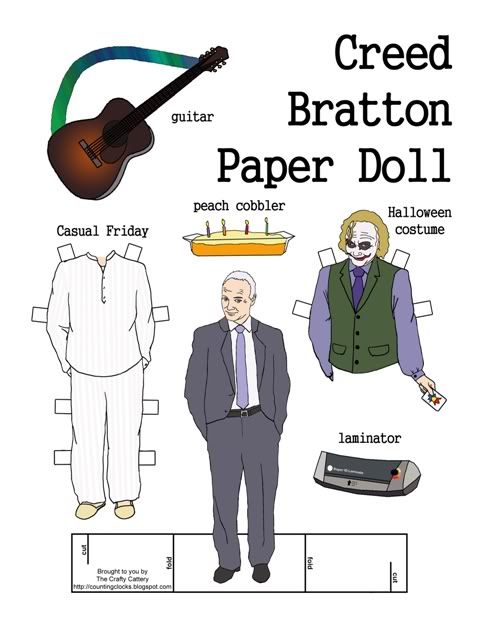
Now I've added a new doll: Creed Bratton! And unlike the other dolls, Creed has two alternate outfits (his Joker Halloween costume and Casual Friday clothes) as well as three accessories (peach cobbler, fake I.D. laminator, and guitar).

Here are the instructions for the doll:

1. Open the PDF file containing the paper doll (above) and print the page out (the stiffer the paper the better - cardstock would be the best).
2. Cut along the outline of the stand, around the paper doll and around the outfits and accessories (you may have to use an X-acto knife to get all the details). Cut two slits in the stand along the lines that say "cut".
3. Fold the stand back along both lines that say "fold" then slide the two slits into each other.
4. Stand the paper doll up. You may have to gently bend the figures and the stand so they'll stand upright.

Thursday, April 22, 2010

"The Office" Peeps Contest

Update 4/29: I can't believe it, my entry won first place! Thanks to everyone who voted for it and thanks to Officetally for holding this awesome contest. Even more unbelievably, Andy Buckley, the actor who plays David Wallace, commented on my diorama!

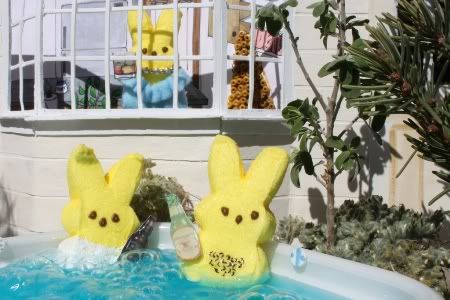
I'm a big fan of the TV show "The Office", so this year I decided to enter Officetally's The Office Peeps Contest. The goal was to recreate a scene from Season 6 (the current season) using marshmallow Peeps. Here's my entry:


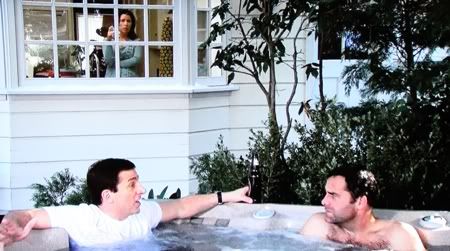
And the scene from the episode "Sabre" it was based on:


This scene was suggested by one of my friends at dundermifflininfinity.com and I thought it was a great idea. Michael goes to to the home of former Dunder Mifflin CFO David Wallace to complain about Sabre, the new company that bought them out. But Michael finds out that joblessness had hit his former boss hard when David invites him into his hot tub and gives him a pitch for his new invention "Suck It" (a vacuum for kid's toys). I think a lot of us liked this scene because we got to see David without his shirt! :D

I thought I'd quickly detail how I made the diorama. It's sort of for my benefit, so I can remember how I made everything the next time I try to make something like this.

The Hot Tub. The hot tub was a plastic food container. I spray painted the back side white and hot-glued some foam "dials" on it. To keep the Michael and David Peeps in place I hot-glued nails to the inside of the container. The water is normal water with a little bit of blue food dye. To create the bubbles I had my husband standing off-camera with a straw. The straw had one end closed and I punched holes with an ice pick in the sides so it would make a lot of small bubbles.

The David Wallace Peep. When I tried to draw David's chest hair directly on the Peep it didn't work too well. The ink wouldn't come out easily and I ended up digging holes in the marshmallow. To fix this I dabbed some clear nail polish on the area and let it dry, then drew the hairs on.

The Michael Scott Peep. I used acrylic paint to give Michael a white shirt. I was bad and didn't let it dry before taking the photos so it quickly began to wash off. Oh well!

The Beer Bottles and Whiskey Glass. I found photos of the actual beers Michael and David were drinking in the scene, resized them to Peep size then printed them out on cardstock. I cut out the bottles and went over the fronts with hot glue to make them look three-dimensional. On the back I painted some clear nail polish so the paper wouldn't dissolve when it got wet, then glued on part of a paper clip so I had a way to attach the bottles to the peeps. I did the same thing for the whiskey glass.

The Greenery. These were all parts of plants and weeds from around my house. I thought using actual plants would look a lot better than trying to make fake plants.

The House. The walls were cardboard. The windowsill was made of popsicle sticks, the muntins (crosspieces) on the windows were plastic cable ties, and the siding is strips of construction paper that have been painted over.

Mrs. Wallace Peep. Her blouse is made of felt and the necklace is an actual necklace that I wired on to her.

Kitchen Backdrop. I drew the backdrop and colored it in with markers. If you look closely in the lower left corner of the window, you'll see a jar of marshmallow fluff that David used in an earlier scene to make a fluff sandwich. There's some sort of weird sculpture of little brown things in the original scene so I recreated it using seed beads painted brown.

The photo was taken outdoors. We had to do it in a rush because once the water went in the hot tub things started falling apart. I wish that I had noticed that there was a shadow of the top of the wall on the back of the kitchen backdrop, if I had I would've easily been able to fix it. Oh well! I'm pretty happy with my Peeps and I hope you liked it too!

Wednesday, March 25, 2009

"The Office" Party Decorations and Activities: Throw a party themed around the TV show!

As part of (another!) task at DunderMifflinInfinity.com, my branch (Ypsilanti) came up with a bunch of printables that can be used by anyone wanting to throw an "Office" themed party. We won the task so I guess our items must be worth something! Here they are:
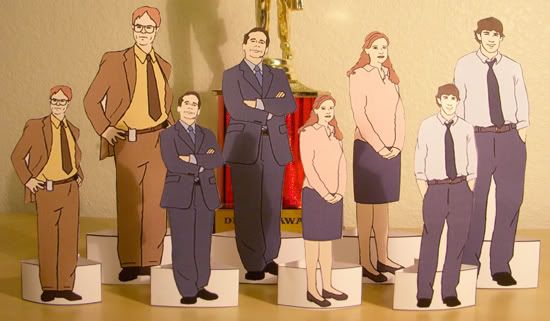
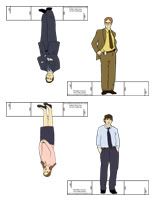
Jell-O Mold Placecards and Butt-Kisser Game


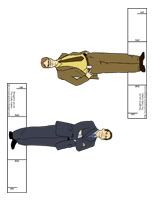
"The Office" Paper Dolls: Dwight, Michael, Pam, and Jim

Not pictured: Who Said That? "The Office" Quotes Game and our Party Recipes.


- Jell-O Mold Placecards (PDF) To decorate your table.
- The Butt-Kisser Game (PDF) Played like Pin-the-Tail-on-the-Donkey, but with Michael's butt as the donkey and Dwight's lips as the tail!
- Who Said That? "The Office" Quotes Game: Questions (PDF) and Answers (PDF) Quiz yourself or your friends by identifying quotes from "The Office".
- "The Office" Paper Dolls (link) I posted these here before, they can be used as decorations or party favors.
- Party Recipes (link) These were also posted here before, there are 14 party recipes submitted by the members of DMI Ypsilanti.

Monday, March 02, 2009

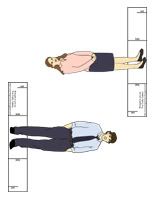
"The Office" Paper Dolls


"The Office" Paper Dolls - Dwight, Michael, Pam & Jim (Dundie in the background for scale)

My friends at the Ypsilanti branch of Dunder Mifflin Infinity (an online game based on "The Office") recently held a Regional Manager Appreciation Day for me. They even had our "Office" Christmahanukwanzakah poem printed up in a book and sent it to me. Aren't they awesome? :)

As a way to show my appreciation for them, I made these paper dolls based on Dwight, Michael, Pam and Jim from NBC's "The Office."  Well, I guess they're not really paper dolls since you can't change their clothes but I'm not sure what else to call them. Mini standees, maybe? Anyhoo, my friends on DMI really seemed to enjoy them so I thought I would share them with you all. Update: I've added three more dolls with accessories and changeable outfits: Creed Bratton, Kelly Kapoor and Michael Scott with his desk.

Here's how to get the dolls on this page:

1. Open the PDF file containing the paper dolls (see below) and print each page out (the stiffer the paper the better - cardstock would be the best).
2. Cut along the outline of the stand and around each paper doll (you may have to use an X-acto knife to get all the details). Cut two slits in the stand along the lines that say "cut".
3. Fold the stand back along both lines that say "fold" then slide the two slits into each other.
4. Stand the paper doll up. You may have to gently bend the figures and the stand so they'll stand upright.


4 Inch Paper Dolls (PDF)


5.5 Inch Paper Dolls - Michael and Dwight (PDF)


5.5 Inch Paper Dolls - Jim and Pam (PDF)


Enjoy, and let me know if you have any problems downloading the files or printing the dolls. :)

Monday, January 12, 2009

'Twas The Night Before Christmahanukwanzakah: A Poem

For over a year now, I've been involved in an online game sponsored by NBC's "The Office" (previous posts here and here). I'm the Regional Manager of the Ypsilanti, Michigan branch of Dunder Mifflin Infinity, which basically means I'm the leader of a group of about 100 fans (most of whom are from the Michigan area). We play the game together and compete against 99 other teams from different parts of the country. As you can probably imagine, with that many competitors it's hard to win, but last week we finally managed to make it happen!

We were competing in a contest to submit the best idea for a holiday party and to include photos and descriptions of the location, food, activities, etc. for the party. To make our party idea stand out we decided to make it into a poem we titled "'Twas The Night Before Christmahanukwanzakah". It describes a party that Michael Scott from "The Office" throws to celebrate all 3 major holidays (Christmas, Hanukkah, and Kwanzaa). You can read the entire poem (with illustrations) here.

Amazingly, our poem was picked by NBC as one of the top 16. The top 16 were then put up to be voted on by people world-wide and, even more amazingly, our poem won the vote! We got twice as many votes as the first runner-up so it was a landslide. And while there isn't any "real-world" prize for winning (it would have to be split between all 100 people in my branch!), I'm still ecstatic to know that we were able to come up with something that so many people enjoyed. :)

Tuesday, August 12, 2008

"The Office" Charity Fundraising Video


The United Way and DunderMifflinInfinity.com (aka DMI, NBC's online game for "The Office") are running a Summer Fundraising Initative to help bring in donations to a number of worthy charities.
Each branch of DMI is sponsoring a charity - my branch, Ypsilanti Michigan, has chosen St. Jude's Children's Research Hospital. St. Jude's is a world leader in researching and treating cancer and other diseases in children, so I think it's a charity that everyone can get behind (that's what she said!).
I made the above video hoping to inspire people to give as generously as they can. If you'd like to give to St. Jude's through our fundraiser, you can DONATE HERE. Thanks for your support - every little bit helps!

Wednesday, May 07, 2008

Behind the Scenes: "That One Night" Music Video

I took a few pictures before I dismantled the sets from my "That One Night" video that I thought I might share. If you have questions about anything feel free to leave me a comment!
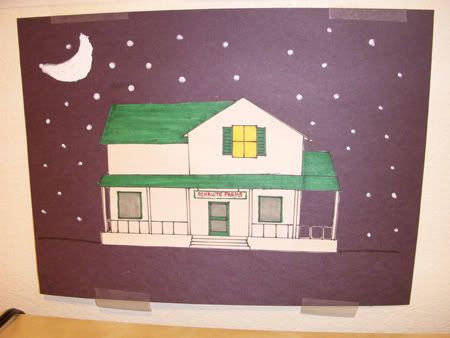
This is the drawing I made of Schrute Farms (at nighttime, hence the pathetic-looking moon!). I based this drawing on what I could see of the farmhouse during the episode "Money" so I probably didn't get everything right. I drew the house on a white sheet of paper, colored it, then cut it out and pasted it onto black construction paper.
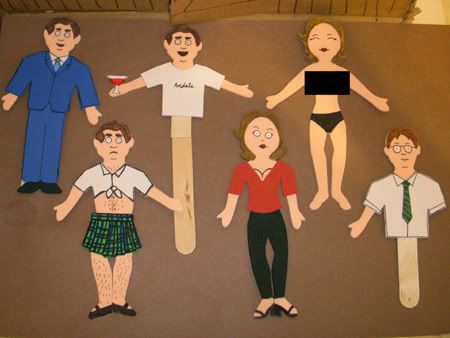

Here are all the puppets I made. It took me a long time to create each one so I cut corners when I knew a body part wouldn't be in the shot (Sandals Michael's legs, Dwight's left arm). The Jan puppets were the hardest to make because both their fronts and backs were appearing on screen so both sides had to look good. On the other puppets I was able to glue everything to popsicle sticks on the back which made it a lot easier. If you're wondering about Jan's censor box, there isn't actually anything under there (she's not anatomically correct, as they say). It just felt wrong to post a picture of her topless!
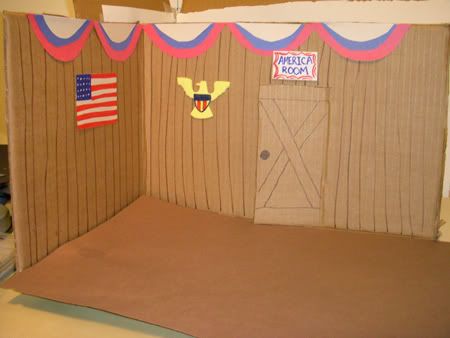

The America room at Schrute Farms. I randomly picked this room for Michael to stay in (we had already seen Irrigation in "Money" and Nighttime sounded a little dull). I was so excited to learn in a deleted scene from "Chair Model" that he actually did stay there! The bed is missing in this photo but it was the same one that appears in the next photo, just with a different bedspread.
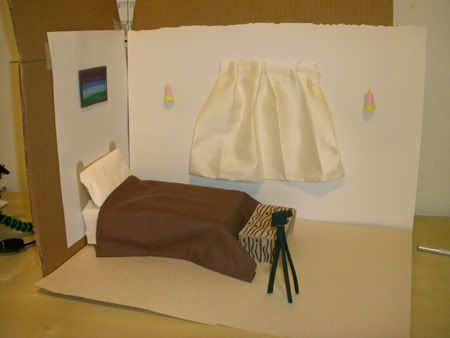

Michael and Jan's bedroom. The bed is a stack of books, covered with a facial tissue and a square of brown fabric. The pillow is made of folded facial tissue too. The bench, camera, candles, and picture are all craft foam and the curtain is ivory fabric.
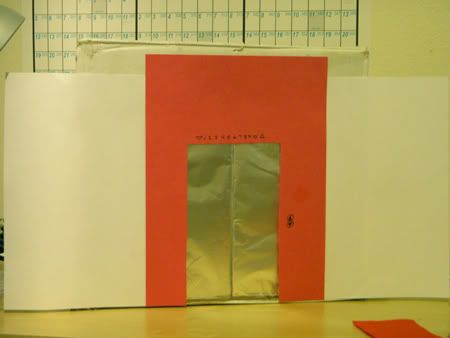
The front of the elevator set. Only the red portion made it into the shot.
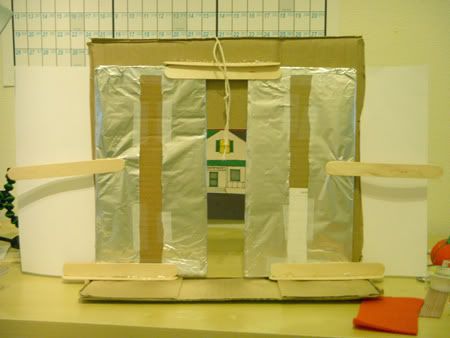

The back of the elevator. This was the most complicated set to build and shoot in because of the sliding doors. I made tracks out of popsicle sticks to keep the doors in place but they didn't slide very smoothly. It took lots of practice to get them to close at the same speed (and without hitting the Michael puppet!).
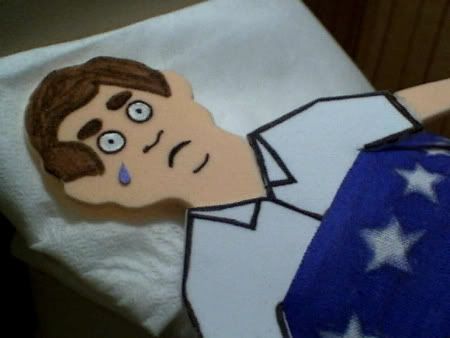
The other difficult scene to film was Michael crying in bed. I started out trying to drip water on his face to make a tear but the drop would either just sit there in the middle of his face or it would fall off too quickly. So I switched to a construction paper tear and used stop-motion animation to make it appear to move. It was frustrating because every time I tried to scoot the tear into the next position with tweezers I would push too hard and the tiny piece of paper would fly off of his face! I then had to hunt it down and start the animation all over again.

Tuesday, May 06, 2008

Update: My Video in "The Office" Contest

Unfortunately my video didn't win, but thanks to everyone who voted for it! I am pleased to report that my video is one of four "runner-ups" that are featured alongside the winning video on the official Office website. Being picked as one of the top 5 out of 134 makes me pretty happy!

Update 2/17/11: I've removed all the links to the videos that were here because NBC took them down. You can still watch my video here.

Wednesday, April 30, 2008

My Video in "The Office" Contest


I entered this video in a contest sponsored by NBC's "The Office" and I've been chosen as one of the finalists!  I made all the sets and popsicle stick puppets from scratch - it took me 3 days to make and film everything.  If you like it, please vote for it here!  You don't have to join or anything, just click on the "vote for this entry" button.  But hurry, the deadline to vote is Thursday May 1st at 3pm Pacific, 6pm Eastern!

Tuesday, April 15, 2008

Charcoal Scarf, Home Library, and "The Office"

I've been busy lately but not doing a whole lot of crafting.  I finally managed to finish a charcoal scarf my mom requested:
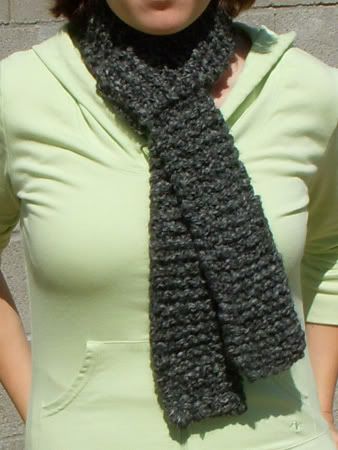

It's just a basic garter stitch scarf, knit with double-stranded Lion Brand Homespun yarn on size 13 needles (the color is "Edwardian").  My mom has asked that I knit 3 more as gifts and she's even offered to pay me for them (*gasp* my first commission!).

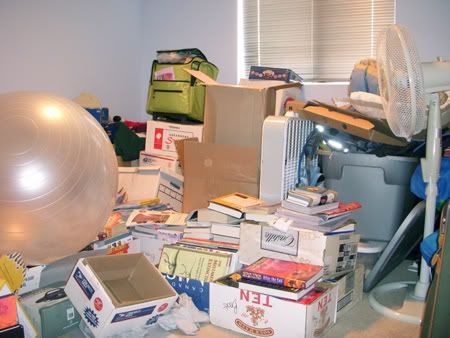
I have also been working on our spare room, aka "the junk room" as evident in this photo:


About 70% of the junk is boxes of books and about 9/10ths of those books are mine (I have a book problem).  We would really like this room to be a library as well as a guest bedroom.  We've found some bookshelves at IKEA but it's going to be a pain to get them here from the Phoenix store.  The boxes containing the shelves are too big to fit in my truck so we'll have to rent a trailer (buying them online is out of the question - the shipping charges are more than the price of the shelves!).

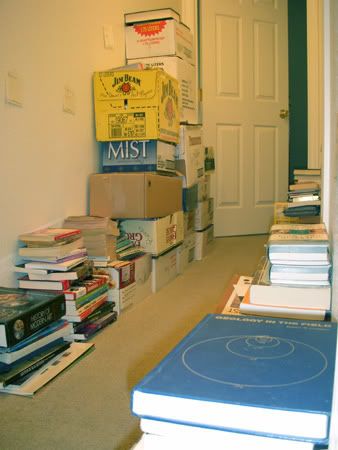
With the way the room is now there would be no where to put them!  So unfortunately I have to clean it out before we can buy anything.  My first task was to drag out all the books and sort them by genre.  I made a lot of piles in our hall:


There were so many books that I decided it would be a good idea to catalog them.  To make it easier, I signed up with an online home library website called GuruLib.  I picked them over other similar websites because they're free and they have a cool feature that lets you scan in UPC codes with a webcam.  The UPC feature was really helpful though it only works on newer books and it requires a high-quality webcam.  So far I've added 642 books to my online library and I still have more to do!

The other thing that's been eating up my time is this website: dundermifflininfinity.com.  It's an online game created by NBC to promote their show, "The Office."  You play as an employee of the online company Dunder Mifflin Infinity (DMI) and you do different tasks (usually related to that week's episode) to earn fake money.  The DMI employees are divided up into different teams called "branches."  Each branch is based in a real town and is led by another employee who is called the Regional Manager. 

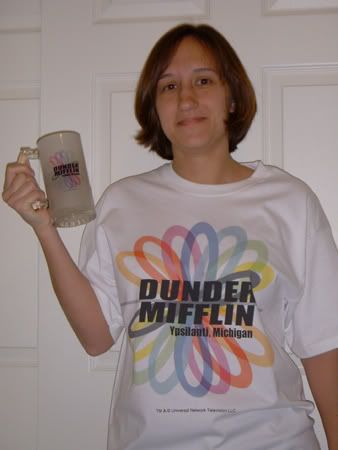
Well, I recently got elected as the Regional Manager of the Ypsilanti, Michigan branch.  Consequently I've been spending a lot of time on DMI.com fulfilling my managerial duties.  I'm probably taking my job too seriously (Kevin thinks so) but I can't help it when I know that other people are relying on me.  Here's me with a shirt and mug with our branch logo on it:


It's not all work though.  I've been having a lot of fun getting to know the other employees - we all love "The Office" so it's fun to geek out about it!  If you're interested in joining please drop me a line.  I'd love to have you in our branch!

Related Posts with Thumbnails